
Manufacturing BOM, Inventory & COGS Tracker
A bill of materials and inventory system in Excel. Log a build and raw materials are consumed through the BOM, cost of goods sold is calculated at weighted average cost and stock levels update at the same time.
Manufacturing BOM, Inventory & COGS Tracker connects raw materials, recipes, production and sales in one Excel workbook. Each product has a bill of materials listing every raw material and the quantity that goes into one finished unit, with a waste allowance. When you log a completed build, the workbook consumes the right quantity of every material, values it at weighted average cost and adds labor and overhead to give the total cost of the build and the cost per unit.
Raw Materials keeps live stock for every material: opening quantity plus goods received, minus quantities consumed by builds, plus stock adjustments. It calculates the weighted average cost from your purchases, stock value, usage over the last 30 days, days of cover, the quantity needed for planned builds and a status of OK, Reorder, Short for plan, Out of stock or Overstock, with a suggested order quantity, last received date and last price.
Products shows the material cost per unit from the BOM, unit COGS including labor and overhead, gross profit and margin, units built and sold, finished goods on hand and value, and the maximum number of units you can build right now from current raw stock. Planned work orders are checked against stock and flagged when a material is short, and products below your margin target are flagged too.
Sales records finished goods sold with revenue, COGS at the product's unit cost, gross profit and margin. The Monthly Report covers twelve months of units built, material, labor and overhead cost, purchases, units sold, revenue, COGS of sales and gross profit with a chart. The Dashboard brings together raw and finished stock value, reorder alerts, planned builds, monthly figures, unit costs, top materials by consumption, latest builds and stock value by category.
Capacity covers 150 materials, 60 products, 500 BOM lines, 1,000 builds and purchases and 1,500 sales lines. Over 37,000 formulas sit in locked cells and protection has no password, so you can unprotect any tab to customise it. Sample data from a fictional furniture workshop is included so you can see every tab working before you add your own. Built for Microsoft Excel (desktop or Excel for the web) and contains no macros.
What's inside
- 11 connected tabs, from a quick-start guide to Settings
- Bill of materials with quantity per unit and waste %
- Builds consume raw materials automatically
- COGS per build: material, labor and overhead
- Weighted average cost from purchases
- Live raw stock, stock value and days of cover
- Reorder, short-for-plan, out-of-stock and overstock alerts
- Suggested order quantity, last price and last received date
- Unit COGS, gross margin and low-margin flag per product
- Max buildable units from current stock
- Planned work orders checked against materials
- Sales with revenue, COGS and gross profit
- 12-month report with chart
- Over 37,000 locked formulas, no macros
Download this template
.xlsx · 11 sheets · includes charts
$9/monthDownload up to 10 templates a month from a library of thousands. Cancel anytime.
- 10 downloads every month
- Cancel anytime
- 14-day refund policy
More in Inventory & Operations
 Inventory & Operations
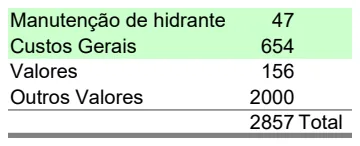
Hydrant Maintenance Cost Tracker
Track hydrant maintenance costs and expenses with automatic calculations for budget oversight.
- Automatic cost summaries with SUM formulas
- Categorized expense tracking (General Costs, Values)
- Line-item maintenance records
 Inventory & Operations
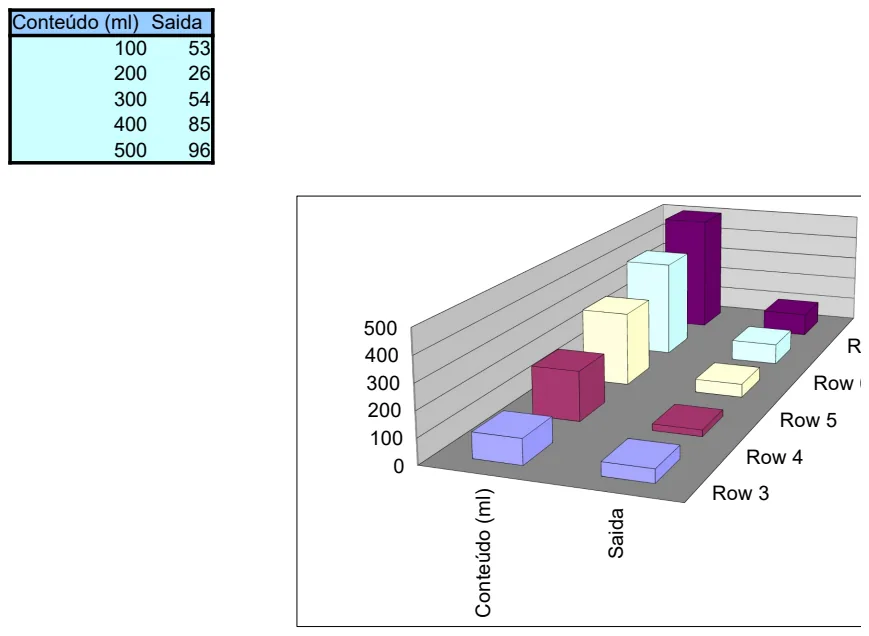
Beverage Yield Calculator
Calculate beverage output based on content volume to optimize portions and waste.
- Input/output tracking
- Yield ratio calculations
- Visual charts for trend analysis
 Inventory & Operations
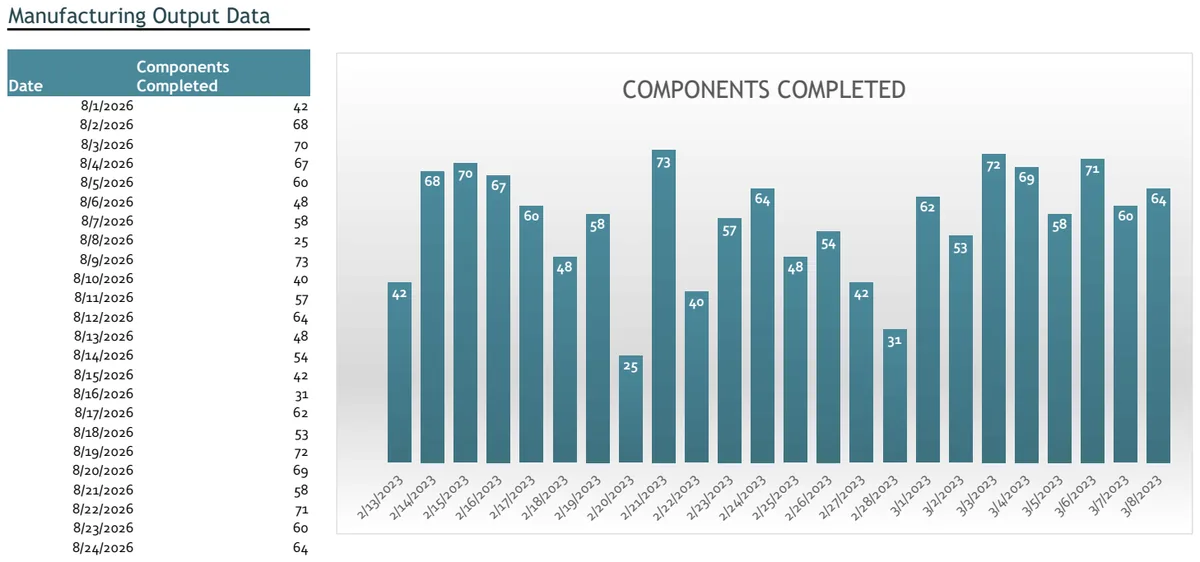
Manufacturing Output Chart
Track daily component production with auto-updating output data and visual charts.
- Auto-updating date field with TODAY() function
- Daily component completion logging
- Production output visualization with charts
 Inventory & Operations
Sala (Room) Utilization and Capacity Tracker
Monitor room capacity, user count, and equipment distribution across multiple spaces.
- Six dedicated room columns for independent tracking
- User count row for occupancy monitoring
- Equipment/machines inventory by room