5 essential Excel balance sheet template sections
Understand your business's financial health with a balance sheet template Excel free download, covering 5 key sections.
When your business transactions start to add up, you might find yourself staring at a blank spreadsheet, realizing you need a clear snapshot of your company's financial health. This moment often occurs when preparing for a loan application, seeking investment, or simply wanting to understand if your assets outweigh your liabilities. Many search for a "balance sheet template Excel free download" because they need a structured way to report this vital information without building it from scratch. The core challenge is accurately categorizing every financial element, what you own, what you owe, and what’s left over.
A balance sheet is a financial statement that reports a company's assets, liabilities, and shareholders' equity at a specific point in time. It's a fundamental component of financial reporting, offering a snapshot of your business's financial position. Without a proper template, manually compiling this can be tedious, prone to errors, and time-consuming, especially for small businesses or freelancers just starting. Thankfully, resources exist to provide this structure, saving you hours of setup.
Understanding the Balance Sheet Equation
At its heart, the balance sheet is governed by a simple but powerful accounting equation: Assets = Liabilities + Equity. Every entry you make must adhere to this principle. If your assets don't equal your liabilities plus equity, your balance sheet isn't balanced, and there's an error somewhere in your accounting.
- Assets: These are the resources your company owns that have economic value. Think cash in the bank, accounts receivable (money owed to you by customers), inventory, equipment, and property. Assets are typically listed in order of liquidity, meaning how quickly they can be converted to cash.
- Liabilities: These are your company's obligations or debts to external parties. This includes accounts payable (money you owe to suppliers), salaries payable, loans, and deferred revenue. Liabilities are usually categorized as current (due within one year) and long-term (due in more than one year).
- Equity: This represents the owners' stake in the company. For a corporation, it includes common stock and retained earnings (the accumulated profits that have not been distributed as dividends). For a sole proprietorship or partnership, it's the owner's capital contributions and accumulated profits.
Key Components of a Balance Sheet Template
A well-designed balance sheet template will have distinct sections for each of these components. You’ll typically find:
Assets Section
This section will be further broken down into current assets and non-current (or long-term) assets.
- Current Assets:
- Cash and Cash Equivalents: Physical currency, checking accounts, savings accounts, and short-term highly liquid investments.
- Marketable Securities: Stocks or bonds that can be easily bought or sold.
- Accounts Receivable: Money due from customers for goods or services already delivered.
- Inventory: Raw materials, work-in-progress, and finished goods held for sale.
- Prepaid Expenses: Expenses paid in advance, such as insurance premiums or rent.
- Non-Current Assets:
- Property, Plant, and Equipment (PP&E): Land, buildings, machinery, vehicles, and furniture. Often presented net of accumulated depreciation.
- Intangible Assets: Non-physical assets like patents, copyrights, trademarks, and goodwill.
- Long-Term Investments: Investments in other companies or securities held for more than a year.
Liabilities Section
Similarly, liabilities are divided into current and non-current categories.
- Current Liabilities:
- Accounts Payable: Money owed to suppliers for goods or services received.
- Salaries and Wages Payable: Amounts due to employees for work performed.
- Taxes Payable: Income taxes, sales taxes, and other taxes owed to government entities.
- Short-Term Loans Payable: Borrowings due within one year.
- Current Portion of Long-Term Debt: The principal amount of long-term debt that is due within the next year.
- Unearned Revenue (Deferred Revenue): Payments received for goods or services not yet delivered.
- Non-Current Liabilities:
- Long-Term Debt: Loans, bonds payable, and mortgages due in more than one year.
- Deferred Tax Liabilities: Taxes that are expected to be paid in future years.
- Pension and Other Post-Retirement Benefit Obligations.
Equity Section
This section details the owners' investment in the business.
- For Corporations:
- Common Stock: The value of shares issued to owners.
- Preferred Stock: Shares with preferential rights over common stock.
- Paid-in Capital in Excess of Par: The amount shareholders paid for stock above its par value.
- Retained Earnings: Accumulated net income less any dividends paid out.
- Treasury Stock: Shares of the company's own stock that it has repurchased. (This is a contra-equity account, reducing total equity).
- For Sole Proprietorships/Partnerships:
- Owner's Capital: The initial and subsequent investments made by the owner(s).
- Owner's Draws/Dividends: Amounts withdrawn by the owner(s) for personal use.
Creating Your Own Balance Sheet in Excel
When you need a balance sheet template Excel free download, you can often find them, but understanding how one is built is key. Here’s a simplified approach to setting one up yourself in Excel or Google Sheets, which can help you customize any template you find.
Let's imagine a very small service business. We’ll use a few common accounts.
Step 1: Set Up Your Sheet Structure
- 01Open a new spreadsheet.
- 02In cell A1, type "Balance Sheet as of [Date]". Replace
[Date]with the specific date you are reporting for (e.g., "Balance Sheet as of December 31, 2026"). - 03In column A, list your account categories and specific accounts.
- 04In columns B and C, you’ll list the values for "Current Period" and "Prior Period" (or the previous year). This allows for comparison.
Step 2: Input Assets
- 01Underneath your date header, create a main heading: ASSETS.
- 02Create a subheading: Current Assets.
- 03List your current asset accounts. For example:
- Cash
- Accounts Receivable
- Prepaid Insurance
- 04Beneath "Current Assets," create a subheading: Non-Current Assets.
- 05List your non-current asset accounts. For example:
- Equipment
- Accumulated Depreciation - Equipment
- Office Furniture
- Accumulated Depreciation - Office Furniture
- 06After listing all asset accounts, create a line for Total Assets. In cell B5 (assuming your first asset account is in B3), you might use a formula like
=SUM(B3:B4)if only cash and AR are above it, or a more specific range like=SUM(B3:B10)to include all listed asset values. You will need to adjust the signs for accumulated depreciation, as they reduce the asset's book value. For example, if Equipment is in B5 and Accumulated Depreciation is in B6, your total for that asset line would be=B5+B6(since accumulated depreciation is typically negative).
Step 3: Input Liabilities
- 01Below your Total Assets line, create a main heading: LIABILITIES.
- 02Create a subheading: Current Liabilities.
- 03List your current liability accounts. For example:
- Accounts Payable
- Salaries Payable
- Accrued Expenses
- 04Below "Current Liabilities," create a subheading: Non-Current Liabilities.
- 05List any non-current liability accounts. For example:
- Notes Payable (Long-Term)
- 06After listing all liability accounts, create a line for Total Liabilities. Use a
SUMformula similar to how you calculated Total Assets.
Step 4: Input Equity
- 01Below your Total Liabilities line, create a main heading: EQUITY.
- 02List your equity accounts. For a sole proprietorship, this might be:
- Owner's Capital
- Owner's Draws
- 03If it’s a corporation, you would list:
- Common Stock
- Retained Earnings
- 04Create a line for Total Equity. Use a
SUMformula.
Step 5: Calculate Total Liabilities and Equity
- 01Create a line for Total Liabilities and Equity. This formula is simple:
= Total Liabilities Cell + Total Equity Cell. For example, if Total Liabilities is in B20 and Total Equity is in B25, the formula would be=B20+B25.
Step 6: Verify the Balance
- 01Create a final line: Check (Assets - Liabilities - Equity). The formula here should be
= Total Assets Cell - Total Liabilities and Equity Cell. This cell must show0(zero). If it doesn't, you have an error somewhere.
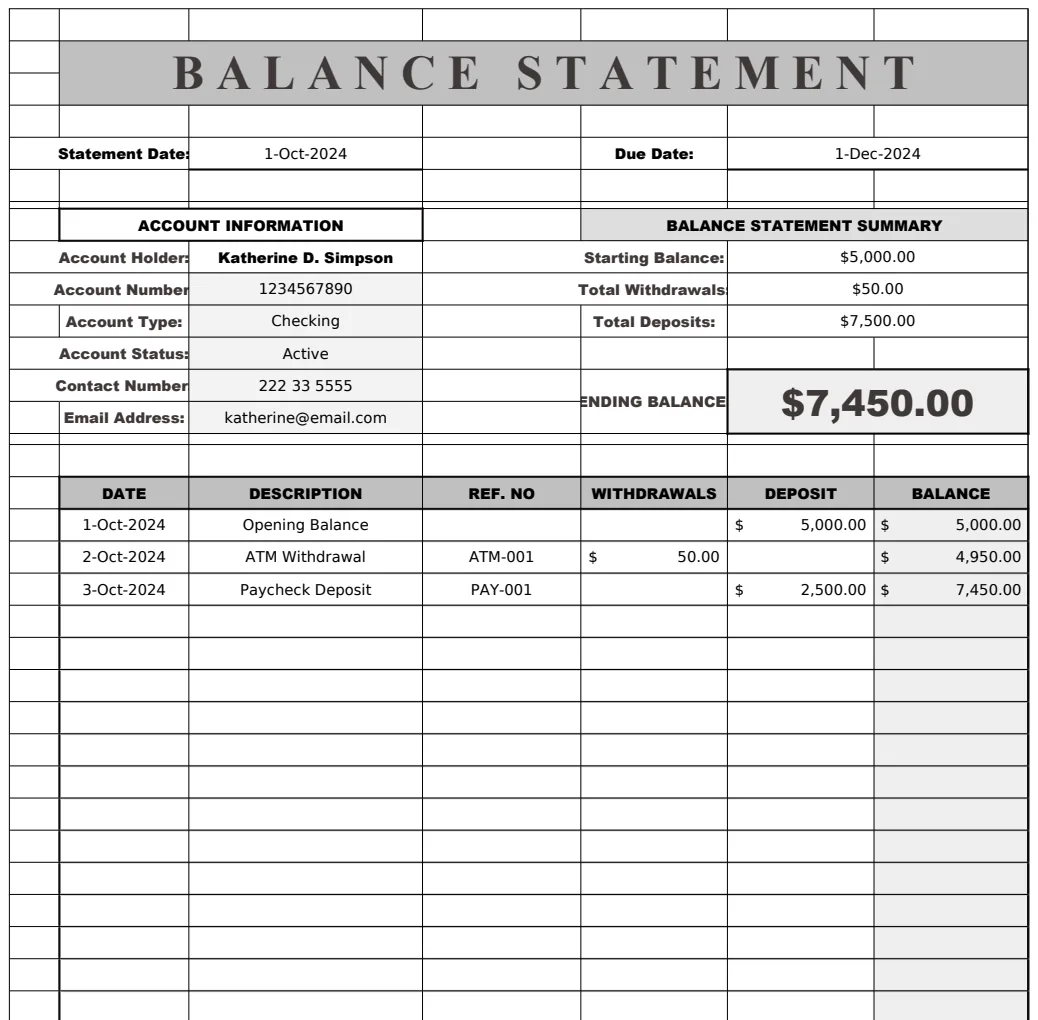
This basic structure can be expanded. For instance, you can add columns for prior periods or even more detailed breakdowns of asset and liability types. If you’re a service business, you might not have inventory, but you'll definitely have accounts receivable. If you’re a merchandising business, inventory becomes a much larger component. For a more professionally formatted and automated solution, consider a template like the Balance Statement Template which automates many of these calculations and presentations.
Common Mistakes to Avoid
- Not Balancing: The most obvious mistake. If Assets do not equal Liabilities + Equity, your sheet is wrong. Double-check all additions, subtractions, and account classifications.
- Incorrect Account Classification: Putting a long-term asset into current assets, or a current liability into long-term liabilities. This distorts your liquidity and solvency ratios.
- Using the Wrong Date: A balance sheet is a snapshot at a specific point in time. Ensure the date is correct and that all figures reflect that exact moment. Transactions occurring after that date should not be included.
- Mixing Income Statement Items: Including revenue or expense accounts on the balance sheet. The balance sheet reports what you own and owe; the income statement reports profitability over a period.
- Incorrect Depreciation Calculation: Forgetting to depreciate assets or using incorrect accumulated depreciation figures. This leads to overvalued assets.
- Ignoring Small Details: Even minor errors in cash reconciliation or petty cash can throw off the entire sheet.
Refining Your Balance Sheet with Templates
While building from scratch is educational, using a pre-built template can save significant time and reduce errors. For businesses that need a robust solution, templates like the IC Balance Sheet Template offer comprehensive features for tracking assets, liabilities, and equity with built-in formulas. If you run a service-based business, a specialized tool like the Balance Sheet Report Service Business can tailor the report to your specific needs, mapping accounts automatically. These tools are designed to produce professional-looking reports efficiently.
Frequently Asked Questions
How often should I update my balance sheet?
For most small businesses, updating your balance sheet monthly is a good practice. This allows you to track trends and catch errors early. Larger or more complex businesses might update weekly or even daily.
Can I use a balance sheet template for personal finances?
While the core principles are the same (assets, liabilities, net worth), personal balance sheets often have different categories (e.g., personal vehicles, mortgages, retirement accounts). You can adapt a business template, but dedicated personal finance spreadsheets or apps might be more suitable.
What's the difference between a balance sheet and an income statement?
A balance sheet shows your company's financial position (what you own and owe) at a single point in time. An income statement (also called a profit and loss statement) shows your company's financial performance (revenues and expenses) over a period of time, like a month or a year. They are complementary reports, with retained earnings from the income statement flowing into the equity section of the balance sheet.
Is there a cost for these templates?
Many basic balance sheet templates are available for free download. However, more advanced, automated, or professionally designed templates, like those found in a comprehensive library, often have a one-time fee for unlimited access and downloads. A library like OpenWorksheet offers access to a wide range of templates, including several balance sheet options, for a single purchase.