Can I really get free debt payoff spreadsheets?
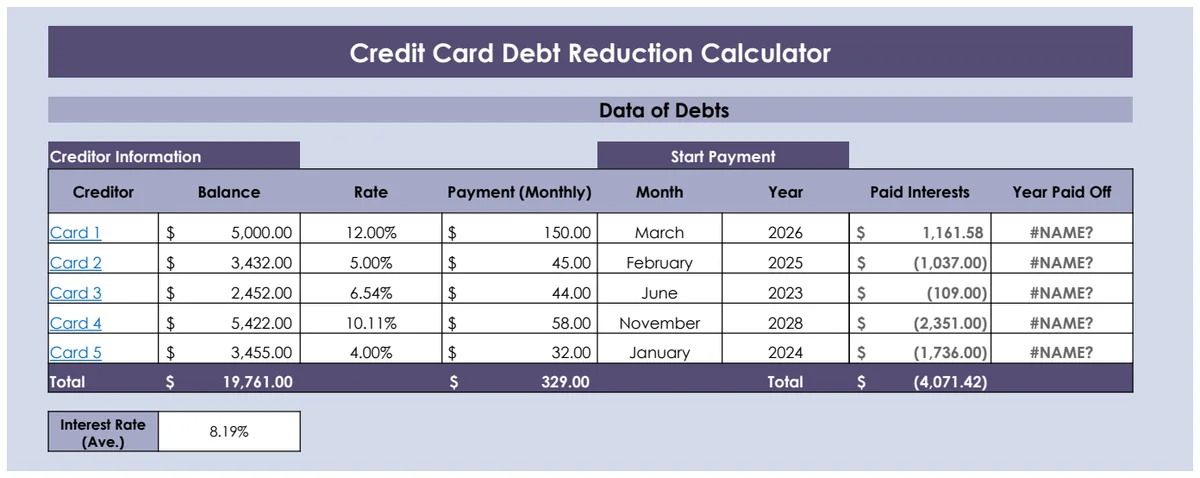
A debt payoff tracker spreadsheet free to download can make a significant difference in managing your finances and accelerating debt freedom.
Using a manual ledger for debt payoff is tedious and error-prone, but a well-structured debt payoff tracker spreadsheet free to download can make a significant difference. Many people start with a simple list of debts, but a truly effective tracker goes deeper, showing you not just what you owe, but how quickly you can get rid of it. A good spreadsheet will help you visualize progress and stay motivated.
The core of any successful debt payoff plan is consistency, and a spreadsheet acts as your accountability partner. It’s more than just a list of balances; it’s a roadmap. This guide will walk you through setting up a robust debt payoff tracker spreadsheet, covering essential columns, formulas, and common pitfalls to avoid.
Essential Columns for Your Tracker
To build a functional debt payoff tracker spreadsheet, you need to capture specific information for each debt. Start with these columns:
- Debt Name: A clear identifier, like "Visa Card," "Student Loan," or "Car Payment."
- Starting Balance: The amount owed when you begin tracking this specific debt.
- Current Balance: The remaining balance. This will be updated regularly.
- Interest Rate (APR): The annual percentage rate. Crucial for calculating interest paid and determining payoff order.
- Minimum Payment: The lowest amount you are required to pay each month.
- Extra Payment: Any additional amount you plan to pay above the minimum. This is where you accelerate your payoff.
- Total Monthly Payment: This is the sum of the Minimum Payment and Extra Payment.
- Interest Paid This Month: The portion of your payment that goes towards interest.
- Principal Paid This Month: The portion of your payment that reduces the actual debt balance.
- Date of Last Payment: Useful for tracking payment cycles.
- Payoff Date (Projected): The estimated date you will be debt-free for this specific debt.
Setting Up Your Spreadsheet
Let's create a practical example. Imagine you have three debts: a credit card, a personal loan, and a car loan.
Sheet Name: Debt Tracker
| Debt Name | Starting Balance | Current Balance | Interest Rate (APR) | Minimum Payment | Extra Payment | Total Monthly Payment | Interest Paid This Month | Principal Paid This Month | Date of Last Payment | Projected Payoff Date | | :------------ | :--------------- | :-------------- | :------------------ | :-------------- | :------------ | :-------------------- | :----------------------- | :------------------------ | :------------------- | :-------------------- | | Visa Card | $5,000.00 | $4,850.00 | 22.00% | $100.00 | $200.00 | | | | | | | Personal Loan | $10,000.00 | $9,500.00 | 9.00% | $200.00 | $100.00 | | | | | | | Car Loan | $15,000.00 | $14,000.00 | 5.00% | $300.00 | $50.00 | | | | | | | Totals | | | | | | | | | | |
Calculating Key Fields
Now, let's add formulas.
- 01Total Monthly Payment (Column G): This is straightforward. In cell G2 (for the Visa Card row), you’d enter
=E2+F2. Drag this formula down for each debt. - 02Interest Paid This Month (Column H): This requires a bit more calculation. Assuming monthly payments, the monthly interest rate is APR / 12. The interest paid is
Current Balance * (Interest Rate / 12). In cell H2, you’d enter=C2*(D2/12). - 03Principal Paid This Month (Column I): This is the portion of your total payment that reduces the principal. It's
Total Monthly Payment - Interest Paid This Month. In cell I2, enter=G2-H2. - 04Current Balance (Column C): This is the most critical update. After making a payment, you'll subtract the principal paid from the previous balance. So, if your balance before payment was $4,850, and you paid $300 in principal, the new balance is $4,550. In your spreadsheet, after you've calculated the Principal Paid for the current month, you can update the Current Balance. A common way to handle this is to have a "New Balance" column that you copy over to "Current Balance" each month, or to use a formula that deducts the principal paid from the previous month's balance. For a simple tracker, manually updating
Current Balanceafter each payment is often easiest.
Tracking Payoff Dates
Projecting the payoff date is more complex and often involves iterative calculations or specialized tools. However, you can approximate it. For a given month, after calculating the principal paid, you can subtract that from the current balance. To get a projected payoff date, you’d typically need to simulate this month by month.
A simpler approach for a basic tracker is to use a separate calculator. For instance, a tool like the Debt Reduction Calculator can take your current balances, interest rates, and total monthly payment you can afford, and then project your payoff timeline and the total interest you'll pay.
Implementing a Payoff Strategy
How you allocate your "Extra Payment" is key. Two popular methods are the Debt Snowball and Debt Avalanche.
Debt Snowball
You pay the minimum on all debts except the smallest, on which you put all your extra payment. Once that debt is paid off, you add its minimum payment to the extra payment you were already making and attack the next smallest debt. This method provides psychological wins.
Debt Avalanche
You pay the minimum on all debts except the one with the highest interest rate, on which you put all your extra payment. Once that debt is paid off, you add its minimum payment to the extra payment and attack the debt with the next highest interest rate. This method saves you the most money on interest over time.
Your spreadsheet should accommodate whichever strategy you choose. For example, if you’re using the Debt Avalanche, you’d sort your debts by interest rate and direct your extra payments accordingly. The Debt Reduction Calculator allows you to compare these strategies directly.
Automating Calculations (Advanced)
For a more dynamic debt payoff tracker spreadsheet, you can automate more.
- Projected Payoff Date: This can be done with formulas, but it gets complex quickly, often involving circular references or helper columns to simulate month-by-month progression. For many, using a dedicated calculator is more efficient.
- Total Interest Paid: You can sum the "Interest Paid This Month" column to see your cumulative interest.
- Total Principal Paid: Summing the "Principal Paid This Month" column shows how much debt you've eliminated.
- Summary Section: Create a section at the top or bottom of your sheet that sums up the "Current Balance" for all debts, the total "Minimum Payment," and the total "Extra Payment" you're making.
If you're looking to visualize your progress and see how different payoff strategies impact your timeline, consider a template like the Savings Snowball Tracker, which can be adapted for debt payoff, or the Debt Reduction Calculator.
Common Mistakes to Avoid
- Not Updating Regularly: The biggest pitfall is letting your tracker get stale. Update your balances and payments at least monthly, or ideally, after each payment.
- Ignoring Interest: Failing to account for interest means your payoff projections will be inaccurate, and you might underestimate the total cost of your debt.
- Setting Unrealistic Extra Payments: While aggressive payments speed things up, they need to be sustainable. If you can't consistently make your extra payments, you'll get discouraged.
- Forgetting Fees: Some debts might have late fees or other charges. Factor these in if they're significant.
- Not Tracking Progress: Simply filling in numbers isn't enough. Look at the "Current Balance" decreasing and the "Projected Payoff Date" moving closer. This visual progress is a powerful motivator.
Frequently Asked Questions
How often should I update my debt payoff tracker spreadsheet?
You should update your tracker at least once a month, ideally after each time you make a payment. This ensures your "Current Balance" is accurate, which is crucial for calculating interest and projecting your payoff date correctly. Consistency is key to staying on track.
What if my interest rate changes?
If your interest rate is variable (like some credit cards or adjustable-rate loans), you'll need to update the "Interest Rate (APR)" column in your spreadsheet whenever it changes. This will affect your "Interest Paid This Month" and "Projected Payoff Date" calculations. If you have a fixed-rate loan, this isn't a concern.
Can I use a debt payoff tracker spreadsheet for student loans or mortgages?
Absolutely. While the complexity of mortgage payments (escrow, taxes, insurance) might warrant a more specialized tool, the core principles of tracking principal and interest apply. For student loans, especially those with varying repayment plans or interest rates, a detailed tracker is very helpful. The principles you learn setting up a basic debt payoff tracker spreadsheet free to download can be applied to any form of debt.
How do I calculate the total interest paid over the life of my debts?
You can add a running total of the "Interest Paid This Month" column. If you're using a more advanced calculator or template, it will often provide a summary of total interest paid for each debt and for all debts combined. This figure is a great motivator to stick to your payoff plan, as it highlights the savings you achieve by paying down debt faster.