Free Google Sheets templates that simplify your small business
Find free Google Sheets templates for small business that go beyond basic spreadsheets to offer real insights and save you time.
Most "free Google Sheets templates for small business" you find online offer little more than a blank spreadsheet with a few pre-typed headers. They often lack the crucial logic, interconnectedness, and dynamic reporting features that actually save you time and provide valuable insights. You need more than just a digital ledger; you need a system that helps you understand your business's financial health at a glance, forecast future performance, and make informed decisions. That's why strategically chosen, well-designed templates are essential for small business owners looking to manage their operations efficiently without breaking the bank.
When searching for free Google Sheets templates for small business, it's easy to get overwhelmed by options that don't quite fit your needs. A template that's too simplistic won't offer the depth required for meaningful analysis, while one that's overly complex can be more intimidating than helpful. The sweet spot is a template that balances ease of use with robust functionality, allowing you to track key performance indicators (KPIs), manage budgets, and project cash flow without requiring advanced spreadsheet skills.
Beyond Basic Spreadsheets: What Makes a Template Truly Useful?
A truly useful template for small business management goes beyond static data entry. It should incorporate formulas that automatically calculate important metrics, conditional formatting to highlight trends or potential issues, and clear visualizations to make complex data digestible. Think about a template that can automatically update a dashboard with your latest sales figures, flag overdue invoices, or project your year-end profit based on current trends. These aren't just fancy features; they are the building blocks of better business management.
For example, a good accounting template will automatically sum your income and expenses to show your net profit for the month, and then carry that information forward to a year-to-date total. Similarly, a dashboard template should pull data from various sheets into one central view, providing a snapshot of your business's performance without you having to manually compile numbers from different sources. The goal is to automate the repetitive tasks so you can focus on analyzing the results and strategizing.
Essential Templates for Every Small Business
Regardless of your industry, certain financial and operational templates are fundamental for any small business. These tools help you maintain a clear picture of your financial standing, plan for future growth, and ensure you're meeting your obligations.
- Budgeting and Expense Tracking: Knowing where your money is going is paramount. A solid budget template allows you to plan your spending, monitor actual expenses against your plan, and identify areas where you might be overspending.
- Cash Flow Forecasting: Understanding your cash flow is critical for survival. A cash flow forecast helps you anticipate periods of surplus and deficit, allowing you to plan for operational needs, investments, or potential shortfalls.
- Financial Statement Tracking: Even for a small business, maintaining basic financial statements like a balance sheet is important for understanding your business's net worth and financial health over time.
- Sales and Revenue Tracking: Monitoring your sales performance is key to growth. A template to track sales by product, service, or customer segment can reveal valuable insights into what's driving your business.
Setting Up Your Small Business Dashboard
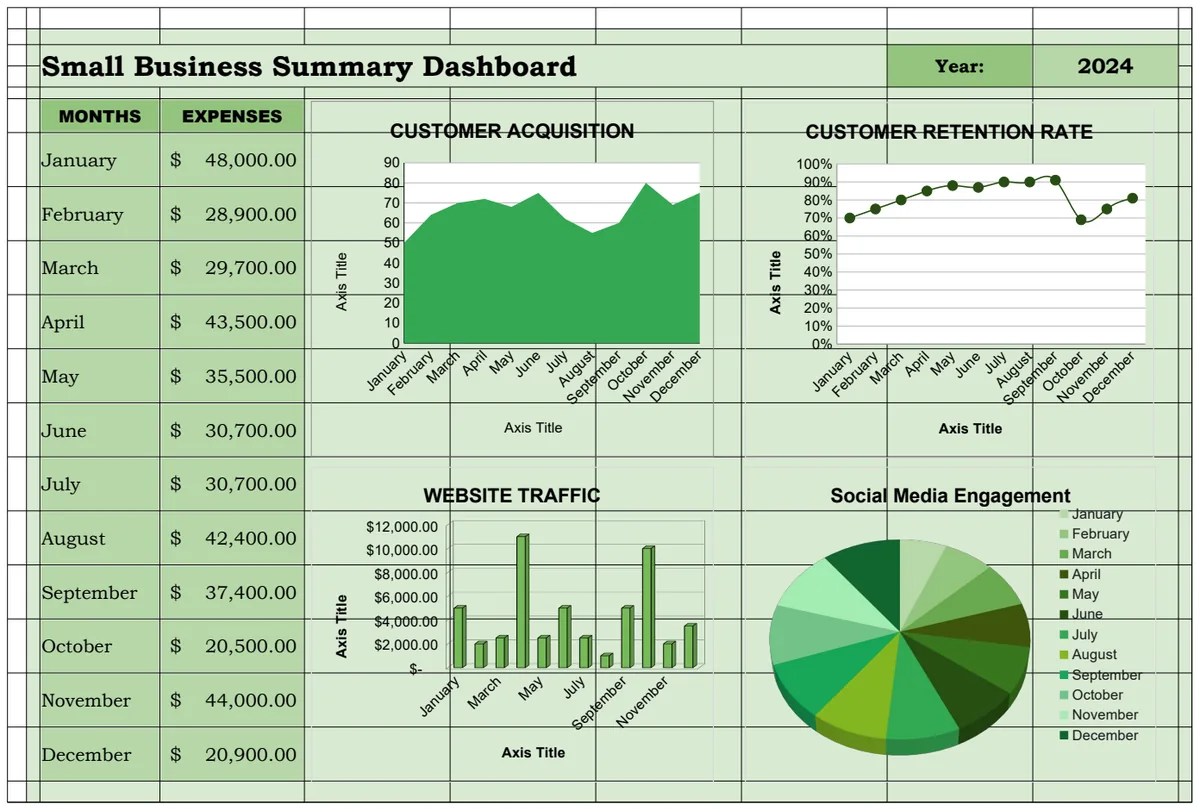
A central dashboard is your command center. It consolidates key information from across your financial and operational data into a single, easy-to-understand view. When looking for free Google Sheets templates for small business, prioritize those that offer a dashboard component or can be easily integrated with one.
Consider a dashboard that includes:
- Key Performance Indicators (KPIs): Revenue, profit margin, customer acquisition cost, customer lifetime value, website traffic, conversion rates.
- Financial Snapshots: Current cash on hand, upcoming payroll, accounts receivable and payable aging.
- Sales Performance: Revenue by product/service, sales trends over time, top-performing sales channels.
- Operational Metrics: Inventory levels, project completion status, customer satisfaction scores.
Using a template like the Small Business Dashboard Template can provide a dynamic overview, often allowing you to select specific date ranges or business units to analyze. This visual approach makes it far easier to spot trends and outliers than sifting through raw data.
Mastering Your Small Business Budget
A well-structured budget is more than just a list of expenses; it's a financial roadmap. A good template should allow you to categorize income and expenses clearly, compare budgeted amounts to actual spending, and calculate variances.
When setting up your budget, consider these categories:
- Revenue: Sales of products, service fees, other income.
- Cost of Goods Sold (COGS): Direct costs associated with producing your goods or services.
- Operating Expenses:
- Personnel: Salaries, wages, benefits, payroll taxes.
- Marketing & Sales: Advertising, promotions, commissions, CRM software.
- Rent & Utilities: Office rent, electricity, water, internet.
- Supplies & Inventory: Office supplies, raw materials, finished goods.
- Professional Services: Accounting fees, legal fees, consulting.
- Technology: Software subscriptions, hardware, IT support.
- Travel & Entertainment: Business trips, client meetings.
- Insurance: General liability, professional liability, health insurance.
- Financing Costs: Loan interest, bank fees.
A template such as the Small Business Budget can help you meticulously track these items, providing a clear picture of your financial health and helping you make informed decisions about where to allocate resources.
Forecasting Cash Flow: A Lifeline for Small Businesses
Cash flow is the lifeblood of any business. Running out of cash, even if your business is profitable on paper, can lead to failure. A cash flow forecast predicts the money coming into and going out of your business over a specific period, typically 12 months. This allows you to identify potential shortfalls in advance and take proactive steps.
A typical cash flow forecast includes:
- Starting Cash Balance: The amount of cash you have at the beginning of the period.
- Cash Inflows:
- Cash sales
- Collections from accounts receivable
- Loan proceeds
- Investment income
- Cash Outflows:
- Payments for inventory and raw materials
- Payroll and related taxes
- Rent and utilities
- Marketing and advertising expenses
- Loan repayments
- Capital expenditures
- Taxes
- Net Cash Flow: Total Inflows minus Total Outflows for the period.
- Ending Cash Balance: Starting Cash Balance plus Net Cash Flow.
Utilizing a tool like the Small Business Cash Flow Forecast Template can help you project these figures, adjust assumptions, and understand the impact of different business decisions on your cash position.
Building a Simple Balance Sheet
A balance sheet is a financial statement that provides a snapshot of a company's assets, liabilities, and equity at a specific point in time. It follows the fundamental accounting equation: Assets = Liabilities + Equity. While often seen as a more advanced accounting tool, a simple version is accessible and highly beneficial for small businesses.
- Assets: What your business owns. This includes current assets (cash, accounts receivable, inventory) and long-term assets (property, equipment, vehicles).
- Liabilities: What your business owes to others. This includes current liabilities (accounts payable, short-term loans, accrued expenses) and long-term liabilities (mortgages, long-term loans).
- Equity: The owner's stake in the business. This is what remains after liabilities are subtracted from assets.
A template like the Small Business Simple Balance Sheet Template can help you track these components over multiple years, showing the growth of your business's net worth and its financial stability.
Common Pitfalls with Free Templates
While free resources are tempting, several common mistakes can undermine their usefulness:
- Over-reliance on manual data entry: If a template requires you to manually copy and paste data between sheets constantly, it defeats the purpose of automation and increases the risk of errors.
- Lack of clear instructions or explanations: Many free templates are shared without context. If you don't understand how a formula works or what a particular metric represents, you're likely to misinterpret the data.
- Inadequate customization: A template designed for a generic business might not fit your specific industry or operational model. You might spend more time trying to force it to work than if you had started with a more adaptable tool.
- Ignoring data integrity: Free templates often lack built-in checks for data accuracy. It's easy to enter a number incorrectly, which can then cascade through your calculations and lead to flawed insights.
- Outdated formulas or features: Google Sheets is constantly evolving. Older templates might use deprecated functions or lack support for newer, more efficient features.
Advanced Tips and Next Steps
How to Make a Free Template Work Harder
To maximize the utility of any template, especially a free one, focus on customization and integration. For instance, if your sales template uses product codes, ensure those codes match your inventory system. If your budget template has predefined expense categories, adapt them to your actual spending patterns. You can often add new columns, rows, or even entire sheets to a template to capture more specific data relevant to your business. Don't be afraid to experiment with conditional formatting to highlight trends, such as making cells turn red if an expense exceeds budget by more than 10%.
What If I Need More Than What's Offered?
If you find that even the best free templates are too limiting, or if you're spending too much time trying to adapt them, it might be time to consider a more specialized solution. For a one-time fee of $9, you can access an entire library of expertly designed templates, including many for small businesses, that offer robust functionality and clear instructions, saving you significant time and potential errors. The library contains a wide array of business planning, accounting, and operational templates, ensuring you can find exactly what you need to manage your business effectively.
How Often Should I Update My Financials?
The frequency of updating your financial tracking depends on your business's pace and complexity, but a good general rule is weekly for critical metrics and monthly for comprehensive reviews. For example, you should ideally update your cash on hand and accounts receivable/payable status at least weekly. Monthly, you should reconcile your bank statements, review your budget versus actual spending, and update your cash flow forecast. For a balance sheet, a quarterly or annual review is often sufficient unless you're undergoing significant financial transactions. Consistent updates are key to maintaining accurate insights.
Can I Integrate These Templates with Other Tools?
Google Sheets offers some integration capabilities, particularly with other Google Workspace applications. For example, you can use Google Forms to collect data (like sales orders or customer feedback) and have it automatically populate a Sheet. You can also use Google Apps Script to build custom connections to external services, though this requires some technical expertise. Many accounting software programs also offer the ability to export data to CSV files, which can then be imported into Google Sheets for analysis or visualization using your chosen templates. For simpler needs, direct copy-pasting or using import functions within Sheets can bridge gaps between different tools.