Downloadable Excel budget templates for easy tracking
Discover customizable Excel budget templates that adapt to your workflow, not the other way around.
The most common failure of free printable Excel templates is their lack of customization, often forcing you to adapt your process to the template's rigid structure instead of the other way around. This usually stems from templates designed for a hypothetical "average" user, filled with pre-set formulas and formatting that don't quite fit your specific needs. You might find yourself spending more time wrestling with a template's limitations than actually getting work done.
When you're searching for printable Excel templates free download, it’s crucial to prioritize flexibility. While many free options exist, they can quickly become frustrating if they don't align with your workflow. Think about what you actually need to track or organize. Are you looking for a simple list, or do you need complex calculations and conditional formatting? Understanding your own requirements upfront will significantly improve your chances of finding a template that genuinely helps.
Why Customization Matters in Your Printable Templates
Many free templates, while visually appealing, are built with a one-size-fits-all mentality. This can manifest in several ways:
- Fixed Categories: Budget templates might have expense categories you never use, or worse, lack categories you rely on. Imagine trying to track freelance income when the template only has columns for "Salary" and "Other Income."
- Inflexible Formulas: A template might include a sum formula that works for ten items, but you have twenty. Or it might have a complex calculation you don't understand and can't easily modify.
- Print-Only Design: Some "printable" templates are designed solely for printing, meaning they might look cluttered or have awkward spacing when you try to edit them directly in Excel before printing.
This is where understanding the underlying structure becomes key. You might download a perfectly good template, but if you can't tweak the column widths, adjust the number formats, or add a few rows without breaking everything, its usefulness is immediately halved.
Common Pitfalls When Downloading Free Templates
Beyond the customization issue, several other traps await those seeking free printable Excel templates.
- Overly Complex Designs: Some templates are packed with so many features, charts, and macros that they become overwhelming. This can be particularly true for budget templates that try to do everything, leading to analysis paralysis rather than clarity.
- Hidden Formatting Issues: You might download a template that looks great on screen but prints with tiny fonts, excessive page breaks, or illegible headers. This often happens when templates aren't properly set up for print areas and page scaling.
- Lack of Support or Updates: Free templates are typically offered "as-is." If you encounter a bug or need a feature added, there's usually no one to ask. What works today might be incompatible with a future Excel update, leaving you back at square one.
- Security Concerns: While less common with reputable sources, downloading from unknown websites can sometimes expose you to malware or viruses hidden within macro-enabled workbooks. Always be cautious about the source.
Essential Elements for a Usable Printable To-Do List
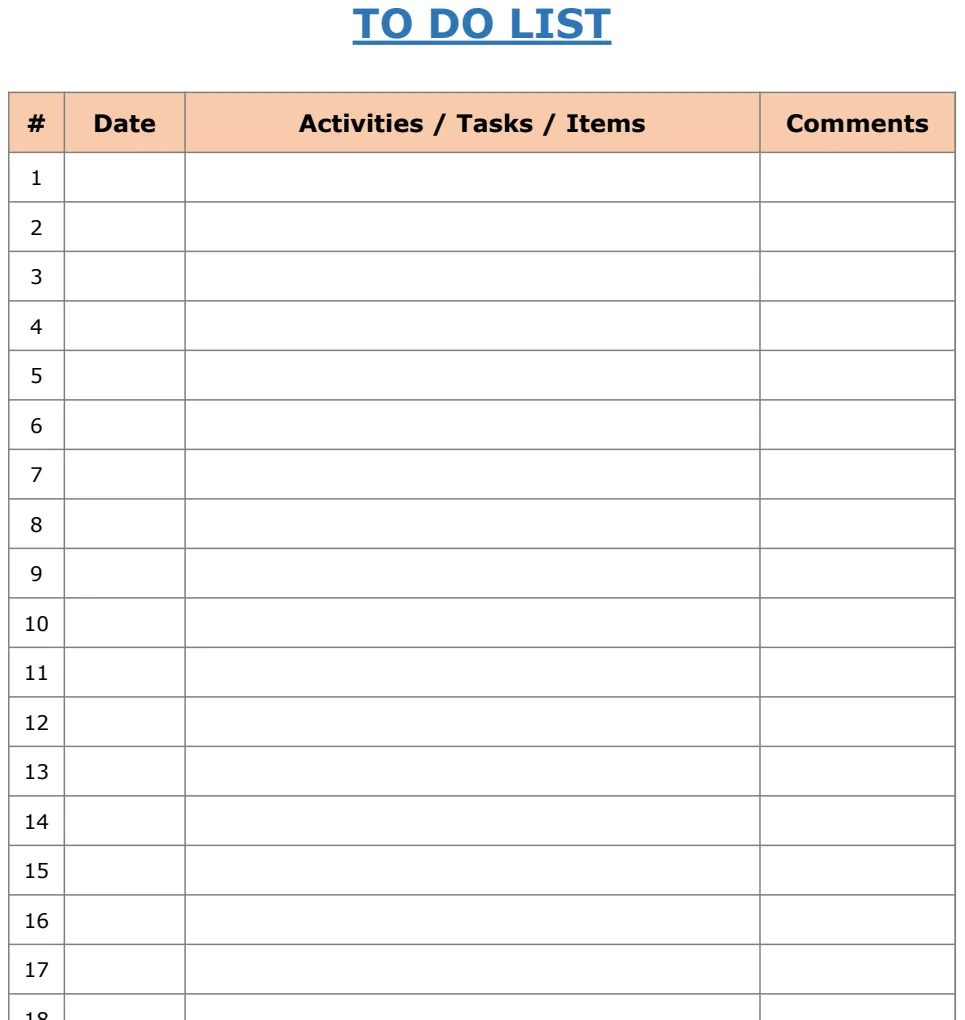
Let's say you're looking for a simple way to manage your daily tasks. A good printable to-do list template should offer more than just blank lines.
Consider a template that includes:
- Task Numbering: A column for sequential numbering (1, 2, 3...) helps keep tasks organized, especially when you reorder them.
- Due Dates/Time: The ability to assign specific deadlines or even times for tasks.
- Priority Level: A column to mark tasks as High, Medium, or Low priority, helping you focus on what's most important.
- Status Tracking: Simple checkboxes or a dropdown (e.g., "Not Started," "In Progress," "Completed") to monitor progress.
- Notes/Comments: A space for any additional details, links, or context related to a task.
If your primary need is this kind of daily organization, you might find a template like the Excel To Do List Template Print to be a solid starting point. It's designed to be both editable and printable, giving you that crucial balance.
Building a Wedding Budget That Actually Works
Planning a wedding involves numerous financial decisions, and a well-structured budget is non-negotiable. When searching for a free printable wedding budget worksheet template, look for one that breaks down costs logically and allows for easy tracking.
Key components to seek in such a template include:
- Categorized Expenses: Sections for major areas like Venue, Catering, Attire, Photography, Entertainment, Decorations, and Miscellaneous.
- Estimated vs. Actual Costs: Columns to input your budgeted amount and the actual amount spent for each item.
- Variance Calculation: A formula that automatically calculates the difference between estimated and actual costs, highlighting overages or savings.
- Payment Tracking: Space to note deposit dates, amounts paid, and remaining balances.
Whether you need a US-centric version or one formatted for A4 paper, having these elements ensures you can manage your wedding finances effectively. A template like the Free Printable Wedding Budget Worksheet Template A4 or its US counterpart can provide the framework you need.
Customizing Your Downloaded Templates for Success
Once you've downloaded a template, the real work can begin. Don't be afraid to make it your own.
- 01Review All Columns and Rows: Delete any columns or rows that are irrelevant to your needs. If a template has 50 rows for expenses and you only have 15, trim it down.
- 02Adjust Formatting:
- Fonts and Sizes: Change fonts to something you prefer and adjust sizes for readability, especially before printing.
- Number Formats: Ensure currency symbols are correct (e.g., $, €, £) and that decimal places are appropriate. Right-click on a cell or column, select "Format Cells," and choose the desired number format.
- Column Widths: Drag the borders between column letters to resize columns so text fits without being cut off.
- 03Modify Formulas: If a formula doesn't work for your data (e.g., a SUM formula that misses a range), carefully edit it. Double-click the cell containing the formula to see its components highlighted. For example, if a formula reads
=SUM(B2:B10)and you need to include row 11, change it to=SUM(B2:B11). - 04Implement Conditional Formatting: This is a powerful tool for visual cues. For instance, in a budget template, you could set up conditional formatting to highlight any expense category that exceeds 10% of the total budget in red. Select the cells you want to format, go to the "Home" tab, click "Conditional Formatting," and choose your rules.
- 05Set Up Print Areas: This is crucial for printable templates. Select the range of cells you want to appear on your printed page. Then, go to the "Page Layout" tab, click "Print Area," and select "Set Print Area." This ensures only your selected data is printed. Also, check "Page Breaks" to ensure it’s printing as one or two logical pages.
Educational Templates: Beyond Basic Assignments
For students or educators, printable Excel templates can be more than just data trackers; they can be learning tools. A template designed for literature analysis, for instance, might guide students through key themes, character development, or symbolic elements.
When looking for an Printable Literature Worksheet Template, you might expect to find fields for:
- Student Name and Assignment Title
- Key Characters and their Traits
- Major Themes and supporting evidence
- Plot Points and their significance
- Symbolism and its interpretation
Such a template encourages structured thinking and provides a clear framework for critical analysis, making the learning process more organized and effective.
Mistakes to Avoid When Using Free Templates
- Assuming All "Free" is Equal: Be wary of sites that offer "free downloads" but require extensive personal information or have hidden clauses. Stick to reputable sources.
- Over-Reliance on Macros: If you're not comfortable with macros, avoid templates that heavily rely on them unless you fully understand their function and source. Macros can be a security risk and can break easily.
- Ignoring Page Setup: For anything you intend to print, always check the "Page Layout" and "Print Preview" options. Many free templates overlook proper margins, page orientation, and scaling, leading to unusable printouts.
- Not Backing Up: Before you start heavily editing a downloaded template, save a backup copy. This way, if you make an irreversible mistake, you can start fresh with the original download.
Can I edit a printable template directly in Excel before printing?
Absolutely. The beauty of Excel templates, even those designed for printing, is that they are dynamic spreadsheets. You can enter data, modify formulas, and adjust formatting in Excel before you commit to printing. This allows you to refine your information and presentation.
What if a free template has too many columns for my printer?
This is a common issue. You have a few options:
- 01Adjust Column Widths: Make columns narrower so they fit on fewer pages.
- 02Change Page Orientation: Switch from portrait to landscape mode in the "Page Layout" settings.
- 03Set a Print Area: Select only the essential columns and set them as your print area.
- 04Use "Fit to Page" Options: Under "Page Layout" > "Scale," you can choose options like "Fit Sheet on One Page" or "Fit All Columns on One Page." Be aware that this can sometimes shrink the text significantly, so always check the print preview.
Where can I find more specialized free printable Excel templates?
Many websites offer vast libraries of free templates. For a single, one-time payment of $9, you can get unlimited downloads from a curated library of Excel and Google Sheets templates, which often include more robust and customizable options than you might find scattered across various free sites. Exploring these dedicated resources can save you a lot of time searching and troubleshooting.