Excel vs. Google Sheets: Which business template wins?
Explore how the best Excel templates for small business owners offer powerful, cost-effective solutions for managing finances and operations.
Many small business owners assume they need complex accounting software to manage their finances and operations. In reality, the best Excel templates for small business owners can provide robust functionality for tracking everything from marketing campaigns to cash flow, often with more flexibility and at a fraction of the cost. These templates are not just spreadsheets; they are powerful tools designed to give you a clear picture of your business's health and performance.
Getting started with powerful financial and operational tools doesn't require a steep learning curve or a significant investment. Excel, with the right templates, becomes an incredibly versatile platform. You can track sales, monitor expenses, plan marketing initiatives, and forecast future performance, all within a familiar interface. This approach allows for customization and integration that generic software might lack.
Why Excel Templates Are a Smart Choice for Small Businesses
Excel offers a familiar and accessible environment for most business owners. Unlike specialized software that may require extensive training, Excel's interface is intuitive. When populated with well-designed templates, it transforms from a simple spreadsheet program into a powerful business management system. You can adapt formulas, add columns, and tailor the views to match your specific business needs, a level of customization that's often difficult or impossible with off-the-shelf software.
The cost-effectiveness is another major advantage. While dedicated software can run into hundreds or thousands of dollars annually, a one-time purchase of a template library, like ours at $9 for unlimited downloads, provides access to a suite of tools that can serve your business for years. This makes advanced financial tracking and strategic planning accessible even for businesses with tight budgets.
Tracking Your Marketing Efforts with Precision
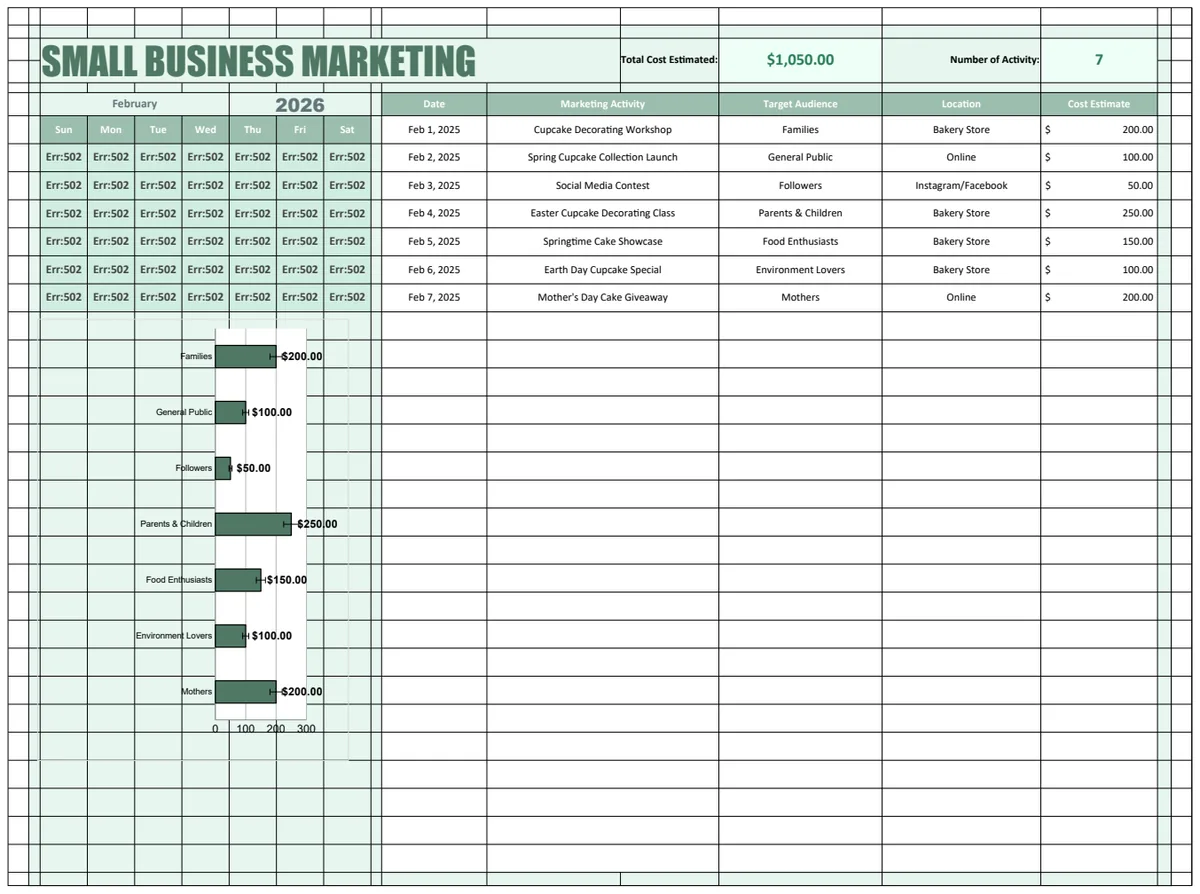
Marketing is a crucial driver of growth for any small business, but it can be challenging to measure its effectiveness. A dedicated marketing template helps you go beyond simply listing activities. It allows you to detail campaign objectives, target audiences, budget allocations, and expected outcomes. More importantly, it provides a framework for tracking actual spend against budget and, crucially, measuring the return on investment for each initiative.
Consider a scenario where you're running a local ad campaign, a social media push, and an email marketing series. Without a system, it's hard to know which channel is delivering the most leads or sales. A marketing template can have columns for "Channel," "Campaign Name," "Start Date," "End Date," "Budget," "Actual Spend," "Leads Generated," and "Revenue Attributed." By consistently filling this out, you can quickly identify which marketing activities are most profitable and where to focus your future efforts. For this purpose, the Small Business Marketing Template is designed to organize all these details efficiently.
Gaining a Holistic View with a Business Dashboard
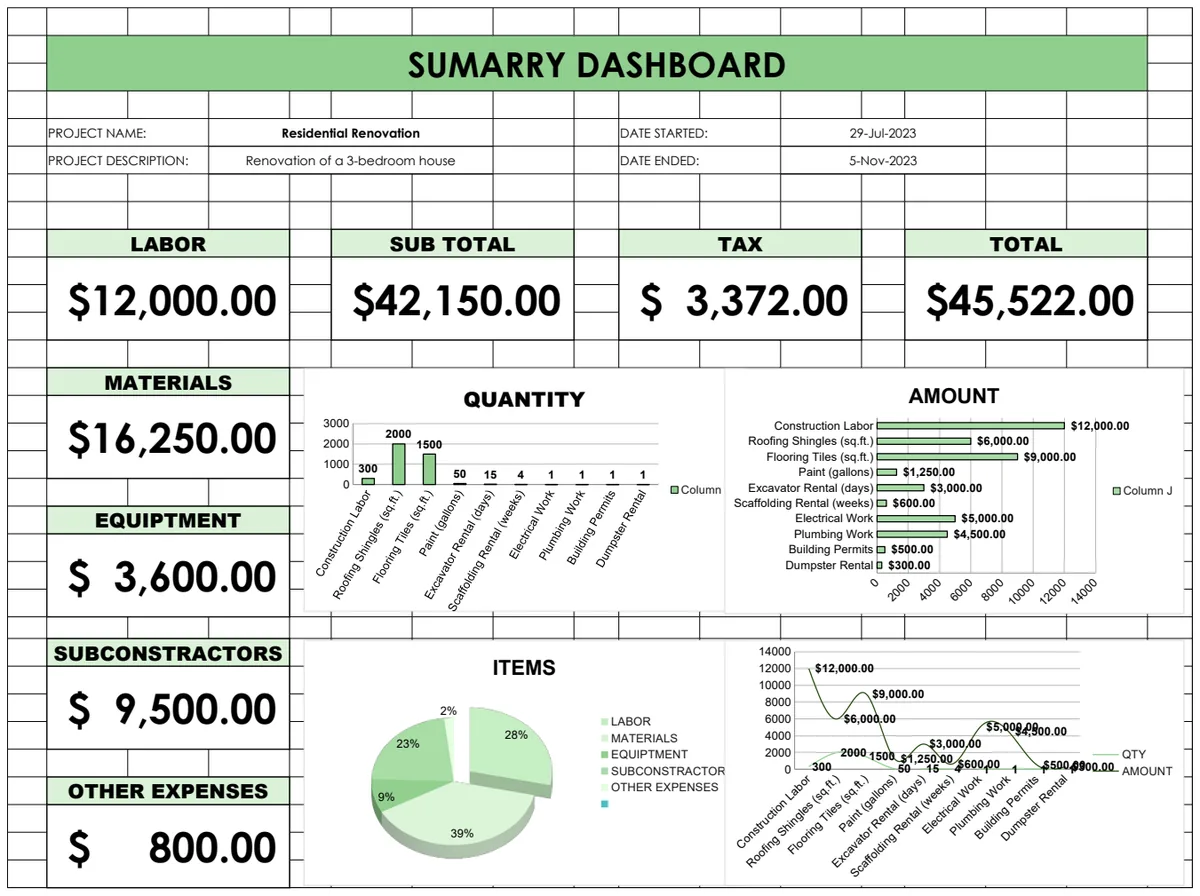
A dashboard template acts as your business's command center. Instead of digging through multiple reports or spreadsheets, you get a consolidated, visual overview of your most critical Key Performance Indicators (KPIs). This allows for quick assessment of your business's health. You can see trends, identify potential problems early, and make informed decisions based on real-time or near-real-time data.
Imagine having a single sheet displaying your monthly revenue, net profit, customer acquisition cost, website traffic, and social media engagement. Each metric might be represented by a chart or a simple number, perhaps with a comparison to the previous month or year. This immediate visual feedback is invaluable. The Small Business Dashboard Template uses dynamic data linking to pull information from other sheets, presenting a comprehensive and easily digestible snapshot of your business's performance across multiple years.
Mastering Your Budget and Cash Flow
Cash is the lifeblood of any small business. Without a clear understanding of your income, expenses, and projected cash flow, you risk running into liquidity issues, even if your business is profitable on paper. This is where robust budgeting and cash flow forecasting tools become indispensable.
A good small business budget template goes beyond simple expense tracking. It should allow you to categorize income sources and expenses with granular detail. This helps identify where your money is coming from and where it's going, highlighting areas for potential cost savings or revenue enhancement. For instance, you might discover that your "supplies" category is significantly higher than anticipated.
Budgeting Walkthrough: Tracking Monthly Expenses
Let's walk through how you might use a budget template to track monthly expenses effectively.
- 01Set Up Your Categories: In your budget template, create clear categories for income (e.g., "Sales Revenue," "Service Fees") and expenses (e.g., "Rent," "Utilities," "Salaries," "Marketing," "Office Supplies," "Software Subscriptions").
- 02Enter Projected Amounts: For each category, enter your budgeted or expected amount for the month.
- 03Record Actual Transactions: As you incur expenses or receive income, record each transaction in a separate "Transactions" sheet, noting the date, description, category, and amount.
- 04Use Formulas to Summarize: In your main budget sheet, use formulas like
SUMIFSto pull the total actual spending for each category from your transactions log. For example, if your transactions are in columns A (Date), B (Description), C (Category), and D (Amount), and your budget sheet has categories listed in column A, the formula in your budget sheet's "Actual" column might look like:=SUMIFS(Transactions!$D:$D, Transactions!$C:$C, $A2). This formula sums all amounts from column D in the "Transactions" sheet where the category in column C matches the category in cell A2 of your budget sheet. - 05Calculate Variances: Add a column to show the difference between your budgeted amount and your actual spending. This is a simple subtraction:
=Budgeted Amount - Actual Amount. A positive number here means you're under budget, while a negative number indicates you've overspent. - 06Review Regularly: At the end of each week or month, review these variances. Are there consistent overspends in certain areas? Are you underspending in others? This analysis is key to controlling costs and optimizing your financial performance.
The Importance of Cash Flow Forecasting
While a budget tracks your planned spending, a cash flow forecast projects the actual movement of cash into and out of your business over a period, typically 12 months. This is critical because you can be profitable but still run out of cash if your clients pay late or if you have large, infrequent expenses. A forecast helps you anticipate shortfalls and plan accordingly, perhaps by arranging a line of credit or adjusting payment terms.
The Small Business Cash Flow Forecast Template is designed for this precise purpose. It helps you visualize your projected cash balance on a rolling basis, accounting for when revenue is actually expected to be received and when bills are due.
Common Pitfalls to Avoid
Even with powerful templates, small business owners can fall into common traps that diminish their effectiveness.
- Inconsistent Data Entry: The most sophisticated template is useless if you don't consistently record your transactions. Make data entry a daily or weekly habit.
- Over-Complication: Resist the urge to add too many fields or complex formulas if you don't truly need them. Start simple and add complexity only when required. The goal is clarity, not a confusing labyrinth of data.
- Ignoring the Data: Creating reports and forecasts is only half the battle. You must actively review the information to make strategic decisions. Don't let your hard work in data entry go to waste by failing to act on the insights.
- Lack of Backups: Always back up your spreadsheet files regularly. Losing months or years of financial data can be catastrophic for a small business.
Frequently Asked Questions
Can Excel templates really replace dedicated accounting software?
For many small businesses, yes. If your needs are primarily tracking income and expenses, managing a budget, forecasting cash flow, and monitoring basic KPIs, a well-designed set of Excel templates can be more than sufficient. They offer flexibility and customization that software often lacks, and at a significantly lower cost. Dedicated software might be necessary for complex inventory management, payroll processing across multiple states, or multi-currency transactions, but for core financial operations, templates are a strong contender.
How do I make sure my Excel data is secure?
Beyond regular backups to cloud storage or external drives, you can use Excel's built-in security features. You can password-protect your entire workbook or individual sheets to prevent unauthorized access or accidental changes. For very sensitive data, consider encrypting the file. However, remember that no digital security is foolproof, so exercise caution with sensitive information.
What if I need a template for something very specific, like project management or inventory?
While the core templates cover essential business functions, you can often adapt them or find specialized ones. For project management, you might track tasks, deadlines, and resources. For inventory, you'd focus on stock levels, costs, and sales velocity. Many template libraries offer a range of options, and even a general budgeting template can be modified with custom columns to track specific project costs or inventory items if you're willing to put in a bit of customization time.
How often should I update my financial templates?
Ideally, you should update your transaction logs daily or at least weekly. Your budget should be reviewed monthly against actual performance. Cash flow forecasts might be reviewed weekly or bi-weekly to ensure you're on track and to make any necessary adjustments. The frequency depends on the pace of your business, but consistency is key to deriving value from these tools.