Free Etsy seller spreadsheet template for tracking sales
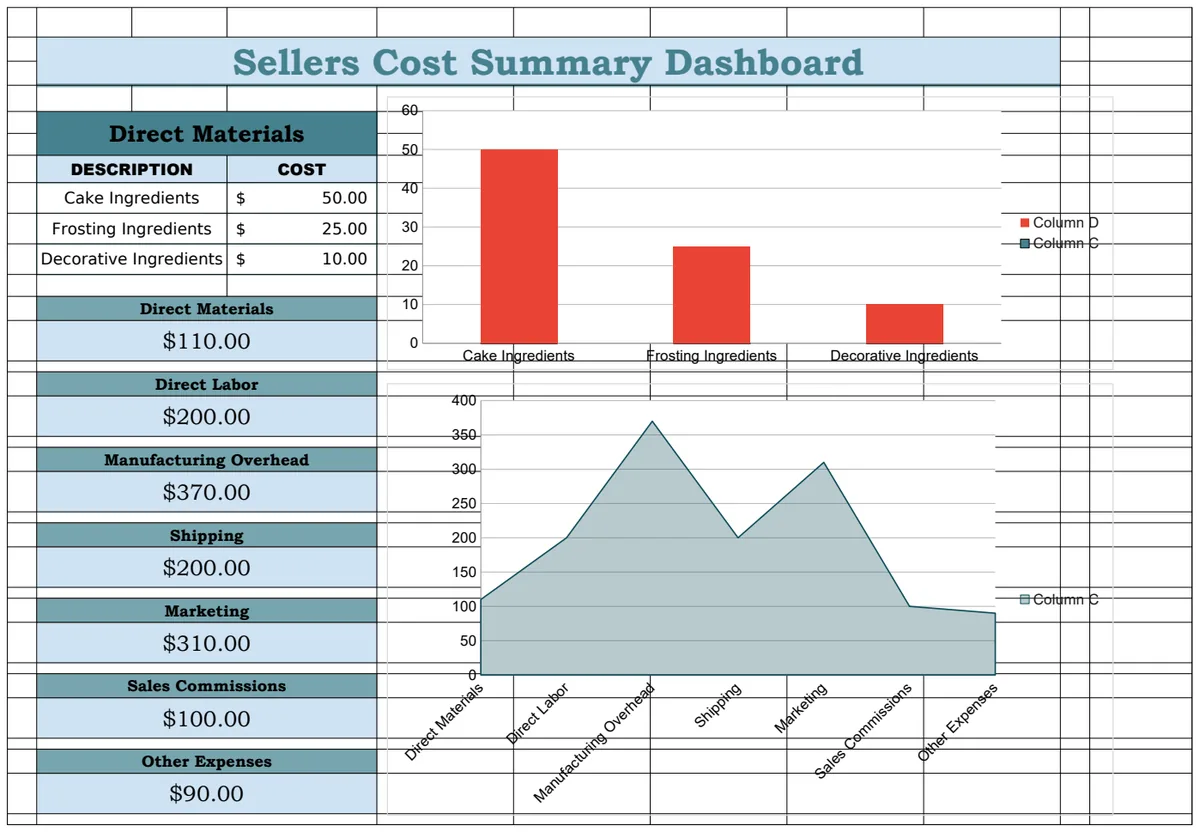
Stop wrestling with basic sales trackers. This free Etsy seller spreadsheet template offers comprehensive tracking for your shop's success.
Many generic "etsy seller spreadsheet template free" downloads offer little more than a basic sales tracker, leaving you to manually calculate crucial metrics like profit margins, cost of goods sold, and year-over-year growth. This often means spending hours wrestling with formulas that aren't quite right, or worse, making business decisions based on incomplete data. You need a system that integrates your sales, expenses, and inventory to give you a clear picture of your shop's health.
A well-structured spreadsheet can be the backbone of a successful Etsy shop, acting as your central hub for all financial and operational data. It’s more than just a list of sales; it’s a tool for understanding what’s working, what’s not, and where your profits are really going. This guide will walk you through building or adapting a template to truly serve your business.
Beyond Basic Sales Tracking
The most common pitfall with free templates is their superficiality. They might list sale dates, item names, and sale prices, but that's where it often ends. To make informed decisions, you need to track more. Think about the total cost to get each item into a customer's hands. This includes not just the material costs but also Etsy fees, shipping supplies, advertising costs, and even the time you invest. Without this granular detail, you're essentially guessing at your profitability.
Essential Columns for Your Etsy Spreadsheet
A robust Etsy seller spreadsheet should include columns that cover the entire lifecycle of a sale, from initial listing to final profit. Here’s a breakdown of what you should aim for:
- Date: The date of the sale.
- Order ID: Etsy's unique identifier for the order.
- Item Name: The name of the product sold.
- SKU (Stock Keeping Unit): If you use SKUs for inventory management.
- Quantity: Number of units sold in the order.
- Sale Price (per unit): The price the customer paid for one unit before any discounts or shipping.
- Shipping Charged: The amount the customer paid for shipping.
- Discounts Applied: Any discounts given to the customer.
- Etsy Transaction Fee: The percentage Etsy takes from the total sale (item price + shipping).
- Etsy Listing Fee: The fee for creating or renewing a listing.
- Etsy Offsite Ads Fee: If applicable, the fee for sales driven by Etsy's offsite ads.
- Payment Processing Fee: The fee charged by Etsy Payments.
- Material Costs (per unit): The direct cost of raw materials for one unit.
- Labor Costs (per unit): An estimated cost for the time spent making one unit.
- Shipping Supplies Cost (per unit): The cost of your packaging materials for one unit.
- Other Direct Costs (per unit): Any other costs directly tied to producing and shipping this item (e.g., custom printing, special packaging).
- Shipping Cost Paid by You: The actual postage cost you paid.
- Advertising Spend (allocated): A portion of your ad budget allocated to this specific sale.
- Total Cost of Goods Sold (COGS): Sum of Material, Labor, Shipping Supplies, Other Direct Costs, and Shipping Cost Paid by You.
- Total Revenue: Sale Price * Quantity - Discounts Applied + Shipping Charged.
- Gross Profit: Total Revenue - (Etsy Fees + COGS).
- Net Profit: Gross Profit - Allocated Advertising Spend.
- Profit Margin (%): (Net Profit / Total Revenue) * 100.
- Notes: Any specific details about the order.
Building Your Spreadsheet: A Step-by-Step Walkthrough
Let's assume you've exported your sales data from Etsy. Here’s how you might structure your spreadsheet to incorporate the columns above. We'll focus on using Google Sheets or Excel for this example.
- 01Import or Paste Your Etsy Data: Start by pasting your downloaded Etsy sales report into a new sheet. You'll likely have columns like "Order ID," "Date," "Title," "Quantity," "Price," and "Shipping."
- 02Add Your Cost Columns: Insert new columns to the right of your imported data for all the cost-related information. This is where you'll manually input or link data from other tracking systems. For example, you might have a separate sheet for raw material purchases.
- 03Calculate Etsy Fees:
- Transaction Fee: In a new column, enter a formula like
= (E2 * 0.065)if "Price" is in column E and Etsy's transaction fee is 6.5%. Adjust the percentage as needed. - Listing Fee: If you track this per sale, you might enter
= 0.20or link to a cell where you've entered the current listing fee. - Offsite Ads Fee: This is a percentage of the total sale price (item + shipping). If "Total Price" is a calculated column (e.g.,
=(E2*F2) + G2for Item Price * Quantity + Shipping Charged), the formula might be=(H2 * 0.12)for a 12% fee. - Payment Processing Fee: This is typically a flat percentage. Formula:
=(I2 * 0.03)for a 3% fee.
- 04Calculate Total Cost of Goods Sold (COGS): Create a column for COGS. If your material cost is in column J, labor in K, shipping supplies in L, other direct costs in M, and actual shipping paid in N, the formula would be
=SUM(J2:N2). - 05Calculate Total Revenue: If "Price" is E, "Quantity" is F, "Discounts" is H, and "Shipping Charged" is G, the formula could be
=(E2*F2) - H2 + G2. - 06Calculate Gross Profit: Using your "Total Revenue" column (say, O) and "Total COGS" (P), plus a column for all Etsy fees combined (Q), the formula is
=O2 - P2 - Q2. - 07Calculate Net Profit: If you have an "Advertising Spend" column (R), your formula becomes
=S2 - R2(where S2 is Gross Profit). - 08Calculate Profit Margin: This is crucial. Formula:
=(T2 / O2) * 100, where T2 is Net Profit and O2 is Total Revenue. Format this column as a percentage. - 09Add Summary Dashboards: Create a separate sheet to summarize your key metrics using formulas like
=SUM(Total Revenue Column),=SUM(Net Profit Column), and=AVERAGE(Profit Margin Column). You can also use pivot tables to analyze sales by item, month, or category.
Common Mistakes to Avoid
Many sellers get tripped up by a few recurring issues when managing their finances with spreadsheets. Be mindful of these:
- Forgetting Variable Costs: Not accounting for Etsy's ever-changing fee structure, or failing to update percentages when they change, can skew your profit calculations significantly.
- Ignoring Shipping Costs: Underestimating the cost of shipping supplies (boxes, tape, labels) or the actual postage can eat into your profits. If you offer "free shipping," remember that cost is baked into your item price.
- Not Valuing Your Time: Labor costs are often overlooked by hobbyist sellers. Even if you don't pay yourself an hourly wage, estimating this cost helps you understand the true profitability and scalability of your products.
- Over-reliance on "Free" Templates: As mentioned earlier, many free Etsy seller spreadsheet templates are too basic. They might look appealing but lack the depth needed for real business analysis. Investing a small amount in a more comprehensive template, like a Sellers Cost Template, can save you countless hours and prevent costly errors.
- Failing to Reconcile: Regularly comparing your spreadsheet totals to your actual bank statements and Etsy payment reports is vital. Discrepancies can indicate data entry errors or missed transactions.
Analyzing Your Data for Growth
Once your spreadsheet is set up, the real work begins: analysis. Look for patterns. Which products have the highest profit margins? Which are your bestsellers, and are they also your most profitable? Are your advertising costs leading to profitable sales?
You might notice that a product with a lower sale price actually yields a higher net profit due to lower material or production costs. Conversely, a high-ticket item might seem lucrative but could be a net drain if its associated costs are too high or if it requires excessive labor. This kind of insight allows you to refine your product offerings, adjust pricing, or optimize your production process.
For instance, if you’re consistently spending more on shipping supplies than you charge for them, you might need to adjust your shipping fees or find a more cost-effective supplier. This is where a tool like a Sellers Invoice can help ensure you're correctly billing for shipping and other services.
Common Follow-Up Questions
How do I track inventory levels alongside sales?
You can add columns to your main sales sheet to deduct sold quantities from an initial inventory count, or use a separate inventory sheet where you list items, their current stock, and cost. Formulas can then link this back to your sales data to update stock levels automatically after each sale is recorded.
What if I sell digital products?
The structure changes slightly. You'll still track sales, fees, and revenue. However, your "cost of goods sold" will be significantly lower, primarily consisting of listing fees, transaction fees, and potentially marketing costs. Material and labor costs become minimal or non-existent. Your focus shifts to marketing spend and overall profit margin.
Can I use this for tax purposes?
Absolutely. A well-maintained spreadsheet like this is invaluable for tax preparation. It breaks down your income and expenses clearly, making it much easier to report your earnings and claim eligible deductions. Ensure you categorize expenses correctly for tax purposes.
What if I sell on multiple platforms?
You'll want to adapt this structure for each platform, creating separate tabs or even entirely separate spreadsheets for each. Then, you can create a master summary sheet that aggregates data from all your selling channels, giving you a complete overview of your entire business performance. This is where something like the Real Estate Closing Costs Breakdown Template offers a good model for multi-category aggregation, though you'd adapt its structure for sales channels instead of property types.