Google Sheets vs. Excel for your free moving checklist
Discover how to elevate your free moving checklist spreadsheet template from a static list to a dynamic planning tool.
The most common mistake people make with a moving checklist spreadsheet template free is using it as a static to-do list. A truly effective moving checklist spreadsheet is dynamic, allowing you to assign owners, track progress with dates, and even budget for each task. Without this level of detail, your checklist becomes a source of anxiety rather than a tool for smooth transitions.
Finding a good moving checklist spreadsheet template free can be a challenge, but the real value comes from how you adapt it. Many templates offer a basic list of tasks, which is a great starting point. However, to truly manage the chaos of relocating, you need to customize it with your specific needs, deadlines, and financial considerations.
What Makes a Moving Checklist Spreadsheet Work?
Beyond just listing tasks like "pack kitchen boxes" or "change address," a functional spreadsheet integrates several key elements. Think of it as your central command for the entire move. This involves not just the checklist itself, but also columns for responsible parties, estimated costs, actual expenses, and completion dates. This structure turns a simple list into a powerful project management tool.
A well-designed template will anticipate common moving pain points. For instance, it should prompt you to consider things like setting up utilities at your new address before you move, or scheduling the disconnection of services at your old one. It also helps you remember the less obvious tasks, such as notifying your bank and updating your driver's license.
Essential Columns for Your Moving Spreadsheet
To build a robust moving checklist, you'll want to include more than just the task name. Here are the columns I recommend, along with brief explanations:
- Task: A clear, concise description of what needs to be done. Examples: "Research moving companies," "Pack bedroom essentials," "Transfer utilities."
- Category: Grouping tasks can help manage complexity. Common categories include "Pre-Move Planning," "Packing," "Logistics," "Utilities," "Finances," and "Post-Move."
- Assigned To: Who is responsible for this task? This is crucial for families or shared moves. Options could be "You," "Partner," "Kids," "Professional Mover."
- Start Date: When should this task ideally begin?
- Due Date: The absolute latest this task should be completed.
- Status: Track progress. Use options like "Not Started," "In Progress," "Completed," "On Hold."
- Estimated Cost: What do you anticipate spending on this task? This helps with budgeting.
- Actual Cost: Once the task is done, record the actual expenditure.
- Notes: A space for any specific details, confirmation numbers, or reminders related to the task.
Example Row Data
Imagine you're packing your breakable items. Your spreadsheet might look like this:
| Task | Category | Assigned To | Start Date | Due Date | Status | Estimated Cost | Actual Cost | Notes | | :------------------ | :--------- | :---------- | :--------- | :--------- | :---------- | :------------- | :---------- | :--------------------------------------- | | Buy packing tape | Packing | You | 2026-07-15 | 2026-07-20 | Completed | $10.00 | $12.50 | Got extra roll, just in case. | | Pack kitchen dishes | Packing | Partner | 2026-07-20 | 2026-07-25 | In Progress | $0.00 | $0.00 | Use bubble wrap and newspaper. | | Schedule movers | Logistics | You | 2026-06-15 | 2026-06-30 | Completed | $1500.00 | $1450.00 | Allied Moving, Quote #AM789. Confirmed. |
Using Formulas for Smarter Tracking
Once your spreadsheet has these columns, you can add formulas to make it even more powerful. For instance, you can use conditional formatting to highlight overdue tasks.
Conditional Formatting for Overdue Tasks
- 01Select the entire data range where your tasks are listed, excluding headers.
- 02Go to Format > Conditional formatting (in Google Sheets) or Home > Conditional Formatting > New Rule (in Excel).
- 03Choose the rule type "Formula is" (Google Sheets) or "Use a formula to determine which cells to format" (Excel).
- 04Enter the formula:
=AND(E2<TODAY(),F2<>"Completed")(Assuming "Due Date" is column E and "Status" is column F, and your data starts on row 2). - 05Choose a formatting style, such as a red fill color, to make overdue tasks immediately visible.
- 06Apply the rule.
This simple formula checks if the due date is before today's date AND if the status is not yet "Completed." Any task meeting these criteria will be highlighted, prompting you to take action.
Budget Tracking with SUMIFS
You can also use formulas to track your moving budget. For example, to see how much you've spent on packing supplies, you could use:
=SUMIFS(H:H, B:B, "Packing", A:A, "*tape*")
This formula would sum the values in the "Actual Cost" column (H:H) where the "Category" (B:B) is "Packing" and the "Task" (A:A) contains the word "tape." You can adapt this to sum costs by category or by assigned person.
Common Mistakes to Avoid
Many people overlook critical steps when using a moving checklist. Here are a few common pitfalls:
- Not updating the status: A checklist is useless if it's not kept current. Regularly update the "Status" column for each task.
- Forgetting to assign ownership: Tasks without a clear owner often fall through the cracks. Make sure every task has someone responsible.
- Underestimating costs: Moving is expensive. Be realistic with your "Estimated Cost" column and track actual spending diligently.
- Treating it as a last-minute tool: A moving checklist spreadsheet template free is most effective when started weeks, if not months, in advance.
Planning for Different Types of Moves
Whether you're moving across town or across the country, the core principles of a good checklist remain the same. However, the scope and complexity will differ.
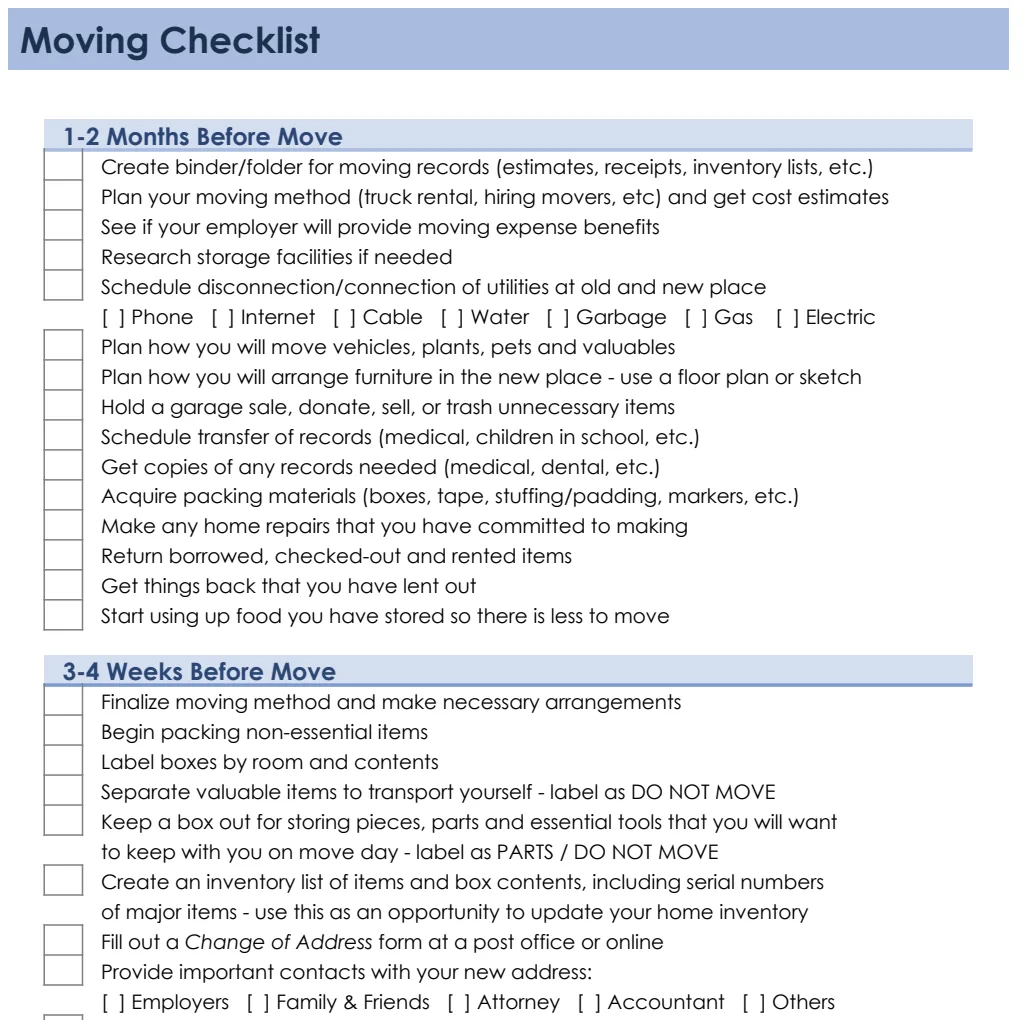
For local moves, you might focus more on the physical packing and logistics of the day itself. For long-distance moves, you'll need to dedicate more time to researching and booking professional movers, potentially arranging temporary storage, and handling interstate paperwork. The Moving Checklist template is a great starting point that can be adapted for any distance.
If you're moving into a dorm or a smaller apartment, a specialized Packing List Templates might be more useful for ensuring you don't forget essentials for a specific type of living situation. These are often more focused on personal items and less on household goods.
Advanced Spreadsheet Techniques
Once you're comfortable with the basics, consider adding more advanced features.
Using Data Validation
To ensure consistency in your "Status" or "Category" columns, use data validation. This allows you to create dropdown lists.
- 01Select the cells in the "Status" column (e.g., F2:F100).
- 02Go to Data > Data validation.
- 03Under "Criteria," choose "List from a range" or "List of items."
- 04Enter your status options: "Not Started, In Progress, Completed, On Hold."
- 05Click Save.
Now, when you click on a cell in that column, a dropdown will appear, preventing typos and ensuring your filters and formulas work correctly.
Creating a Dashboard View
For a more visual overview, you could create a separate sheet that acts as a dashboard. This sheet could use formulas like =COUNTIF(Sheet1!F:F, "In Progress") to show you how many tasks are currently in progress, or =SUM(Sheet1!H:H) to show your total moving expenses. This gives you a quick snapshot of your move's overall status.
What If I'm Moving for Business?
If your move involves a business, the checklist needs to expand significantly. You'll need to account for business-specific tasks like notifying clients, transferring business licenses, setting up new office equipment, and ensuring minimal disruption to operations. While a personal moving checklist is a start, a business move requires a more strategic approach. For comprehensive business planning that might include relocation considerations, a template like the Business Plan Checklist with SWOT Analysis could be adapted, or you might look for specialized business relocation checklists.
Frequently Asked Questions
How detailed should my moving checklist be?
It should be detailed enough to cover all critical tasks and sub-tasks, but not so granular that it becomes overwhelming. Aim for tasks that are actionable and can be assigned to a person or group. Think about what you'd need to tell someone else to do to execute the task.
Can I use a free template for a very complex move?
Yes, a free template can absolutely work for a complex move, provided you're willing to customize it thoroughly. The structure and columns mentioned above are designed to handle complexity. You'll just need to invest the time in populating it with all the necessary tasks, which might be hundreds for a large household or business relocation.
What if I have multiple people helping with the move?
This is where the "Assigned To" column becomes essential. Clearly defining who is responsible for each task prevents confusion and ensures accountability. You can use names, family roles, or even hire contractors as "assigned to" entities.
How do I keep track of all my receipts for moving expenses?
Your spreadsheet's "Actual Cost" column is the first line of defense. For physical receipts, consider creating a dedicated folder or envelope labeled "Moving Expenses" where you keep all original documents. You can also take photos of receipts and store them digitally in a cloud folder, referencing the file path in your spreadsheet's "Notes" column. This is especially helpful for tax purposes or if you're seeking reimbursement.